
Skip to content
IdeaScore
Evaluation

Scoring your committee can defend

Invite evaluators, assign by expertise, collect conflict declarations and run as many rounds as the call needs. Rubrics carry weights and descriptors, calibration evens out strict and generous scorers, and the leaderboard shows human, AI and blended views side by side.

42
evaluators in the example call
5
rubric criteria out of 50
3
rounds, screening to pitch day
3
leaderboard views

A ranking is only as good as the process behind it. Evaluation is the part of IdeaScore that a committee will be asked about, so every score carries who gave it, against which criterion, in which round, and what the descriptor said at the time.

How evaluation works

Evaluators

Get the right reader on the right application

Invite faculty, mentors and investors by email, collect their areas of expertise and let IdeaScore auto-assign submissions to match, or assign by hand when you know better. Workload is visible per evaluator, so nobody is quietly given forty applications. Conflict-of-interest declarations are collected before any assignment is confirmed, and a declared conflict withdraws that evaluator from the record.

  • Invite by email, with a welcome that explains the task
  • Auto-assign by expertise, or assign by hand
  • Workload visible per evaluator before you confirm
  • Conflict-of-interest declarations block the assignment
  • Deadlines with reminders that go out on their own
Seed Fund 2026 · Cohort III

Evaluator workload

5 of 42 · round 2 closes in 6 days

  • Prof. A. Iyer

    CleanTech · Materials

    9 / 9
  • Dr. S. BanerjeeConflict declared on 1

    Biotech · Diagnostics

    5 / 8
  • M. Rao, investor

    DeepTech · Hardware

    4 / 11
  • Prof. L. Menon

    AgriTech · Policy

    7 / 7
  • K. Desai, mentor

    HealthTech

    2 / 6

Auto-assign matches expertise to sector and stops at the workload cap you set.

Rubrics

A rubric with descriptors, not a number out of ten

Build criteria with weights and write a descriptor for each band, so a seven means the same thing to a professor and to an investor. Evaluators score in a stepper with the descriptor in front of them, save a draft and come back, and submit when the batch is done. Blind review hides applicant identities where the programme requires it, and the running total is always visible so nobody has to add up.

  • Criteria with weights that sum to the programme total
  • A written descriptor per band, visible while scoring
  • Draft and submit, so a batch can be done in sittings
  • Blind review hides identities when the programme needs it
  • Comments per criterion, kept with the score
An evaluator's scoring page, showing weighted rubric sliders, the running total and the pitch deck panel.
What an evaluator sees: rubric sliders, the weighted total and the deck, side by side
Calibration

Correct for the strict reader and the generous one

Two evaluators can read the same application and differ by four points because of how they use a scale, not because of what they thought. Calibration normalises each evaluator's scores against their own distribution, so a ranking reflects judgement rather than scoring habits. It is optional, shown alongside the raw numbers rather than replacing them, and the committee can see both.

  • Z-score normalisation per evaluator
  • Raw and normalised shown together, never swapped
  • Turned on per programme, not forced
  • Outliers surfaced for a second read
Seed Fund 2026 · Cohort III

Calibration

Halcyon Grid · normalised by z-score

EvaluatorRawAdjusted
Prof. A. Iyer

their mean across the round: 8.6 / 10

48.546.1
Dr. S. BanerjeeStrict scorer

their mean across the round: 6.4 / 10

4346.4
M. Rao, investor

their mean across the round: 7.5 / 10

4847

Both columns stay on the record. Calibration is a view the committee can turn on, not a rewrite of what an evaluator submitted.

Rounds

Promote forward, round by round

A call is rarely one pass. Screening narrows the pile, a jury round scores what is left against a heavier rubric, and a final round runs on pitch day. Each round carries its own rubric, its own evaluators and its own deadline, and promotion moves a defined number of teams forward with the decision recorded. Earlier rounds stay readable, so a committee can see how a team got to the final.

  • A rubric, an evaluator set and a deadline per round
  • Promotion by rank, by threshold or by hand
  • Earlier rounds remain visible after promotion
  • Pitch day can be the final round of the pipeline
Seed Fund 2026 · Cohort III

Round 1 · Screening

181

teams in this round

Light rubric, 3 criteria

2 readers each · pass mark 30 / 50

Top 40

Round 2 · Jury

40

teams in this round

Full rubric, 5 criteria

3 evaluators each · blind review

Top 12

Final · Pitch day

12

teams in this round

Pitch rubric, 4 criteria

Live panel · 8 minutes each

Promotion is by rank, by threshold or by hand, and the decision is recorded.

Leaderboard

Human, AI and blended, in the same table

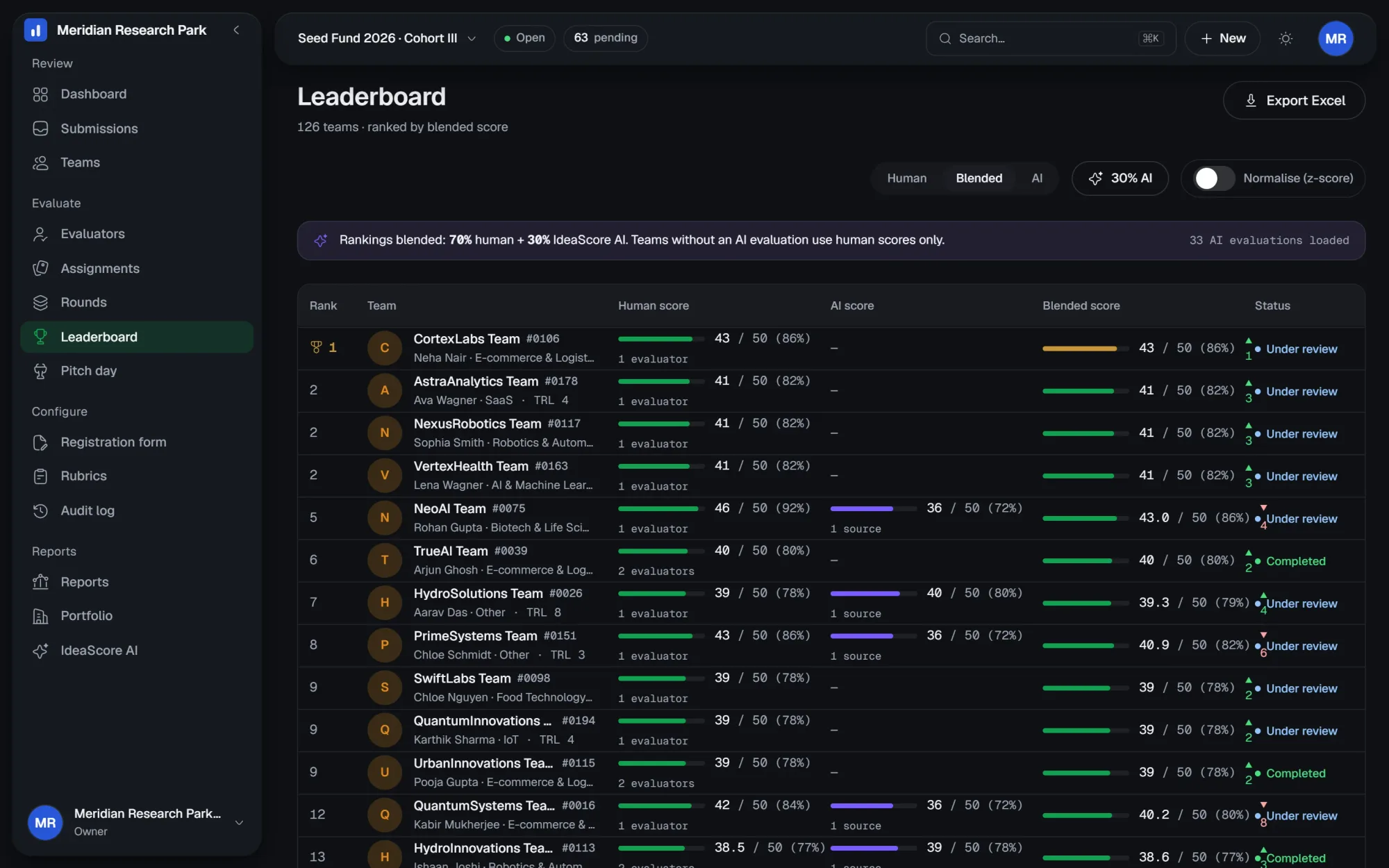
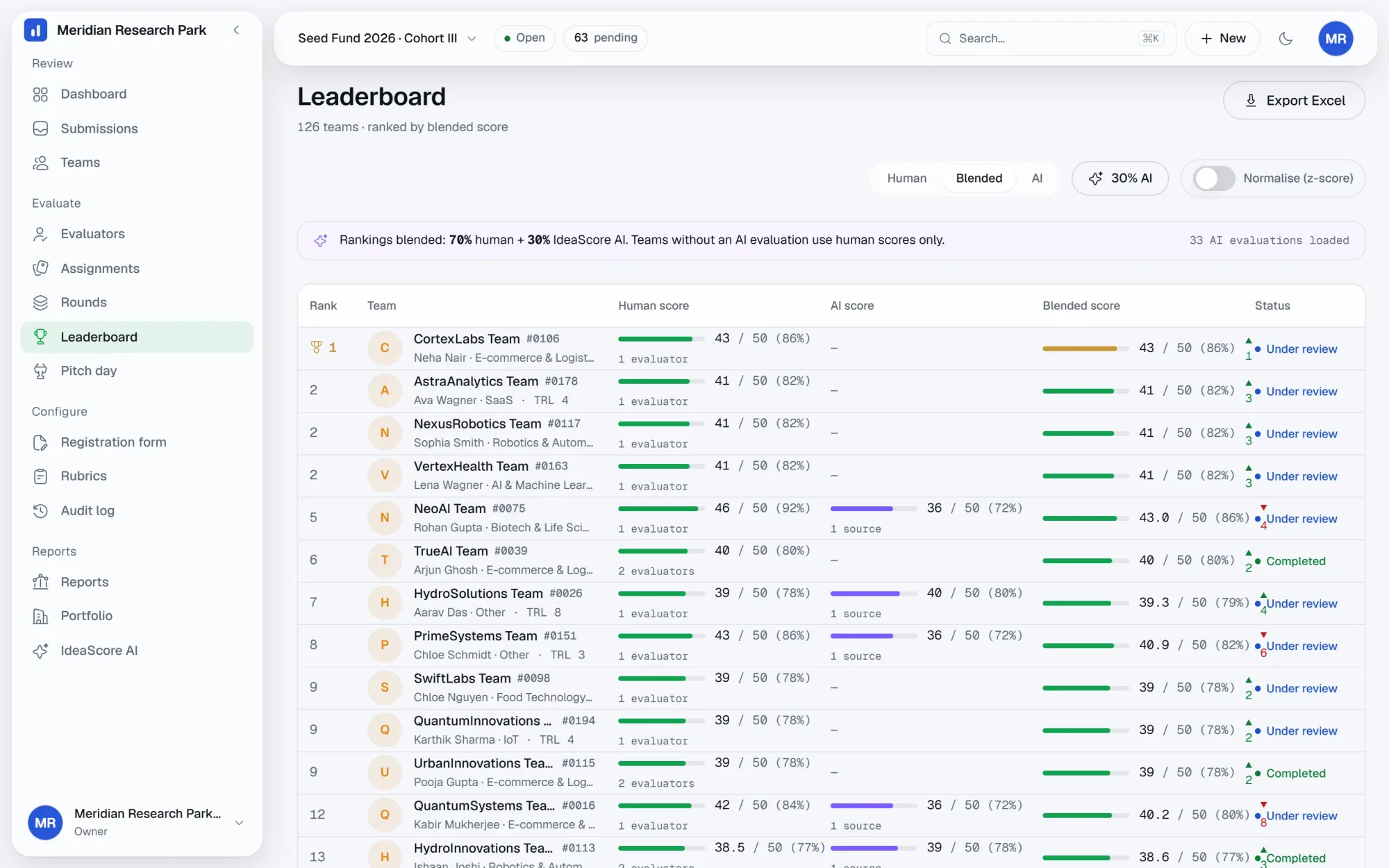
The leaderboard is what the committee reads. Switch between the human score, the IdeaScore AI score and a blended view, and watch the ranking reorder so you can see which teams the two disagree about. Rank one carries the gold marker, movement against the human ranking is shown as a delta, and the whole table exports to the committee report.
  • Human, AI and blended views on the same teams
  • Movement against the human ranking shown as a delta
  • Per-criterion breakdown on any row
  • Exports straight into the committee report
The IdeaScore leaderboard, showing ranked teams with human, AI and blended scores and the rank-one marker.
The leaderboard as the committee sees it, with the blended view selected

Leaderboard

5 of 126 teams · ranked by human score

  1. 1
    Halcyon Grid#0142
    46.5 / 50 (93%)
  2. 2
    Quorum Bio#0127
    43 / 50 (86%)
  3. 3
    Farmlight#0139
    41.5 / 50 (83%)
  4. 4
    Tessel Labs#0118
    39 / 50 (78%)
  5. 5
    Orrin Health#0083
    37 / 50 (74%)
The IdeaScore leaderboard in dark mode, showing ranked teams with human, AI and blended scores and the rank-one marker.
The leaderboard in the app, with the blended view and per-team deltas.
Specification

Everything in evaluation

  • Evaluator invites

    Email invitations with a first-run walkthrough of the task.

  • Workload view

    How many submissions each evaluator holds, before you assign more.

  • Auto-assign by expertise

    Match submissions to evaluators by declared areas.

  • Conflict of interest

    Declarations collected up front; a conflict withdraws the assignment.

  • Deadlines and reminders

    Per-round deadlines with reminders that send themselves.

  • Blind review

    Applicant identities hidden where the programme requires it.

  • Weighted rubrics

    Criteria with weights and a written descriptor per band.

  • Draft and submit

    Scores save as drafts so a batch can be finished in sittings.

  • Calibration

    Z-score normalisation per evaluator, shown beside the raw score.

  • Multi-round pipelines

    Rounds with their own rubric, evaluators and promotion rule.

  • Leaderboard views

    Human, AI and blended rankings with deltas between them.

  • Score export

    Per-criterion scores and comments into Excel or the committee report.

Questions committees ask

How does calibration work?
Each evaluator's scores are normalised against their own distribution using a z-score, so a consistently strict reader is not penalising the teams they happened to read. Raw scores are always kept and shown.
Can evaluators see each other's scores?
Not by default. A programme admin can open a consensus view where the committee compares scores, but during scoring evaluators see only their own.
What does blind review hide?
Applicant and team identities, and anything in the form marked as identifying. The answers, the venture description and the attached deck are still readable.
How is the blended score calculated?
It is the mean of the human score and the IdeaScore AI score for the same team, shown as a view rather than written into the record. The human score always remains the one of record.
Can an evaluator change a submitted score?
A programme admin can reopen a submitted score before the round closes. The change is recorded in the audit log with both values.
How many rounds can a programme have?
As many as the call needs. Three is typical: screening, a jury round and a final pitch round. Each one has its own rubric and evaluator set.

See IdeaScore run a call with your own rubric

A 30-minute walkthrough with a founder, using your programme's form and criteria.