

Skip to content
IdeaScore
Review

Triage hundreds of submissions without losing the thread

A table built for volume: case numbers, filters, resubmission and duplicate flags, and a dossier that opens in place. Approve, reject, reopen or undo with a reason, and every action lands in the audit log.

181
submissions in the example call
126
teams behind them
4
review states per submission
1
audit log, never editable

Review is where a call stops being a pile and starts being a shortlist. Everything a programme team does to a submission — read it, flag it, annotate it, decide on it — happens against one record and is written down.

How review works

The pile

One table that holds the whole call

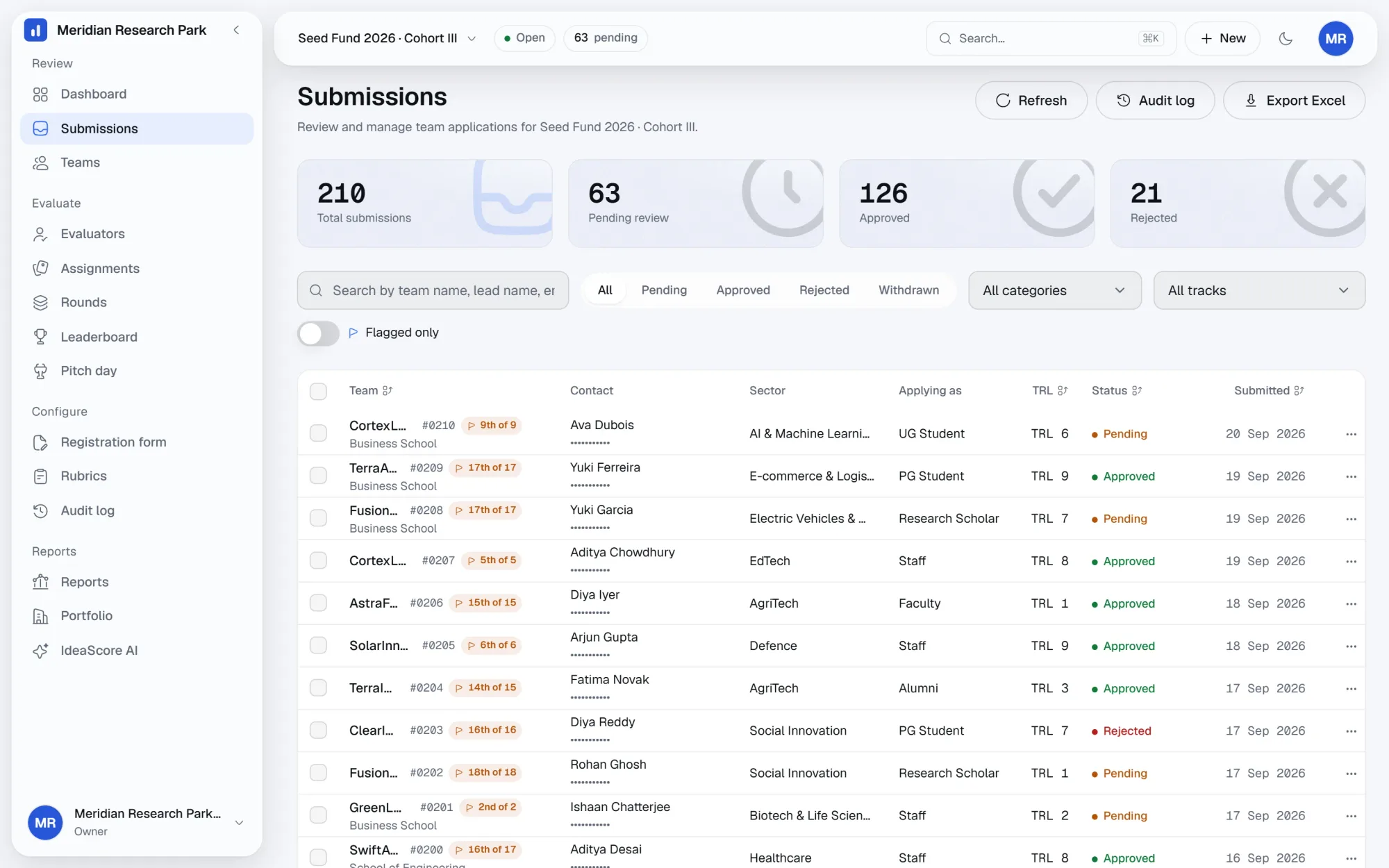
Every submission arrives with a case number in the #0142 style that people can say out loud in a meeting. Filter by status, sector, stage of development or anything the form collected, search by team or case number, and sort to bring the undecided to the top. Select a range and approve, reject or tag the lot in one action, then export the current view to Excel for the people who still want a spreadsheet.
  • Case numbers that survive the whole programme
  • Filters on status, sector, stage and form fields
  • Bulk approve, reject and tag on a selection
  • Excel export of exactly the view you are looking at
The submissions table for a call, showing case numbers, a resubmission flag and filters across the pile.
The submissions table: case numbers, filters and the resubmission flag, at full scale
Flags and lineage

Know which application you are actually reading

Teams resubmit. Sometimes the same venture applies twice under two names, sometimes a team fixes a broken deck and sends it again. IdeaScore flags resubmissions and likely duplicates as they arrive and keeps the lineage, so a row reads as the second of two and links back to the first. You decide which one counts; the other is marked superseded rather than deleted.

  • Resubmission flags with a link to the earlier record
  • Duplicate detection across teams and contact details
  • Superseded records kept, never silently removed
  • Lineage visible in the dossier and in the export
Seed Fund 2026 · Cohort III

Halcyon Grid

CleanTech · 2 attempts in this call

#0106First attemptSuperseded

Pitch deck failed to open; team asked to resubmit

02 Aug 2026Kept, not deleted
#0142Counted attempt2nd of 2

Complete; approved for the jury round

18 Aug 2026Approved

Also flagged

#0151 matches #0119 on venture and contact details. Marked as a likely duplicate for a person to confirm.

Dossier

Everything about one application on one screen

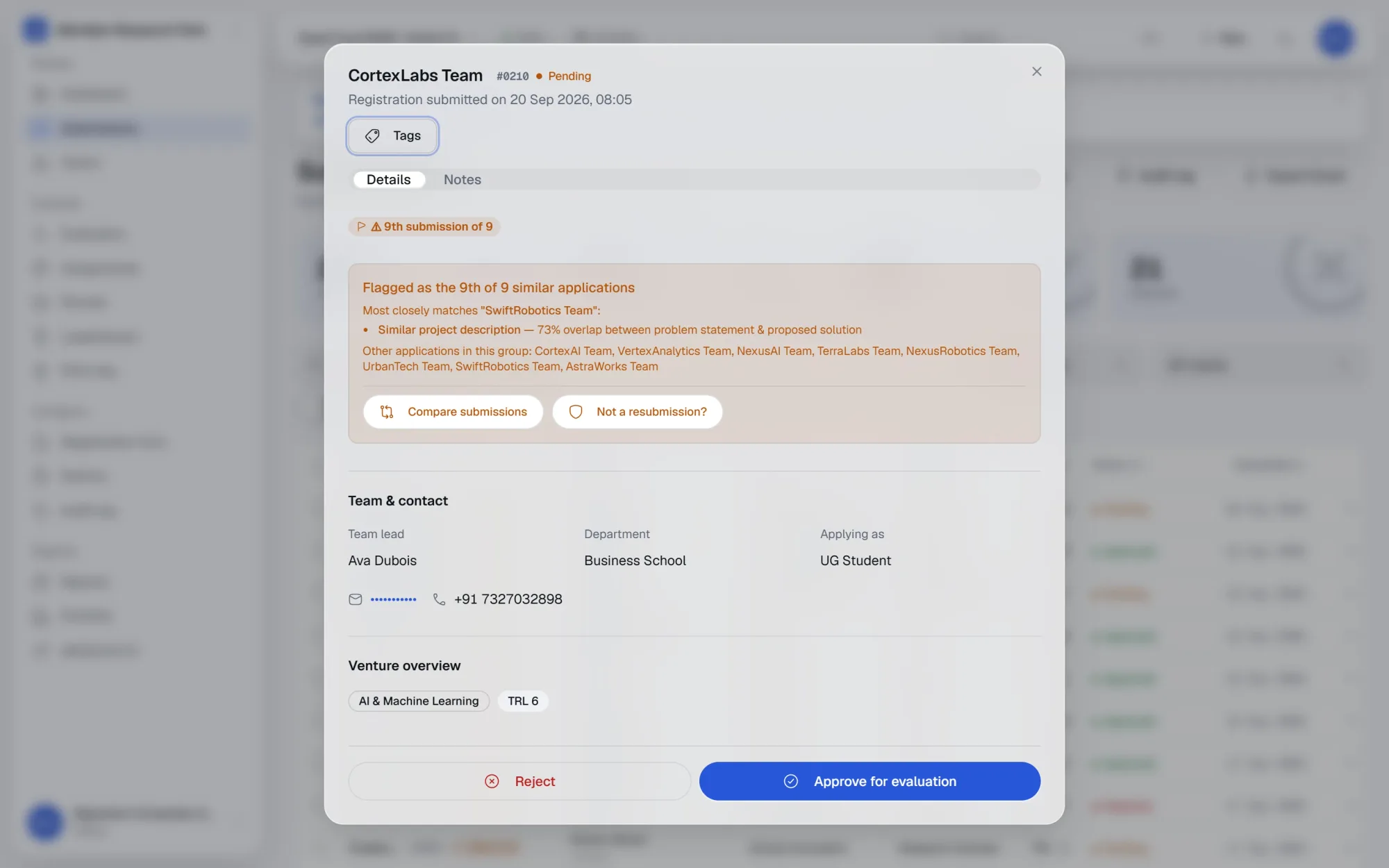
Open a submission and you get the answers, the attached files, the scores so far, the notes and the history, in tabs rather than in separate screens. Leave a note, tag the record for a theme, mention a colleague to pull them in, and see what the last person decided and why. The dossier is where a review actually happens, which is why nothing in it needs a second window.
  • Answers, files, scores, notes and history in one place
  • Notes with mentions that notify the person named
  • Tags for themes, tracks or follow-up
  • Decision reason recorded with the decision
The submission dossier for a team, showing the resubmission-lineage banner, team and contact details and the venture overview.
The dossier: lineage, team and contact, and the venture overview in one panel
Audit log

A record your committee can be shown

Every approval, rejection, reopen, undo, tag and bulk action is written with the actor, the target and the time. The log is append-only: a mistake is corrected by a new entry, never by editing an old one. When a decision is questioned weeks later, the answer is a line in a log rather than a search through inboxes.

  • Actor, action, target and timestamp on every entry
  • Append-only, so corrections leave a trail
  • Filterable by person, submission or date
  • Included in the committee export
Seed Fund 2026 · Cohort III

Audit log

Append-only

  • Approved #0142

    Programme admin · Reason: meets the CleanTech track

    18 Aug · 16:52
  • Added note on #0142

    Ravi, programme staff · Mentioned 1 colleague

    18 Aug · 16:41
  • Flagged #0142 as resubmission

    Programme admin · Linked to #0106

    18 Aug · 14:07
  • Bulk tagged 12 submissions

    Programme admin · Tag: Needs evidence

    18 Aug · 11:20
  • Reopened #0083

    Organisation owner · Undo of a rejection

    17 Aug · 09:14

Corrections are written as new entries. Nothing in the log is edited.

Specification

Everything in review

  • Submissions table

    Every submission in the call with a permanent case number.

  • Filters and search

    Filter by status, sector or form field; search by team or case number.

  • Resubmission flags

    Later attempts flagged and linked back to the earlier record.

  • Duplicate detection

    Likely duplicates surfaced across teams and contact details.

  • Lineage

    The chain of attempts kept intact, with the counted one marked.

  • Dossier view

    Answers, files, scores, notes and history in tabs on one screen.

  • Notes and mentions

    Threaded notes with mentions that notify the person named.

  • Tags

    Label records by theme, track or follow-up, then filter on them.

  • Approve and reject with reasons

    A decision is never recorded without the reason behind it.

  • Undo and reopen

    Reverse a decision or reopen a closed record, with both steps logged.

  • Bulk actions

    Approve, reject or tag a selection in a single action.

  • Excel export

    Export the current filtered view, columns and all.

Questions programme teams ask

How are duplicates detected?
By matching the venture and team identifiers a submission carries, together with contact details. Matches are flagged for a human to confirm; nothing is merged or removed automatically.
Can a rejected submission be brought back?
Yes. Reopen restores it to the pile, and both the original decision and the reopening stay in the audit log with the reason given for each.
Who can see the notes on a submission?
Programme staff on that programme. Notes are internal; applicants never see them, and evaluators see only what their assignment includes.
Does the export include everything?
The Excel export follows the view you are in: the same filters, the same columns, plus scores and flags. The committee report is a separate, formatted export.
Can the audit log be edited?
No. It is append-only. A correction is a new entry, which is what makes it usable as evidence when a decision is questioned later.

See IdeaScore run a call with your own rubric

A 30-minute walkthrough with a founder, using your programme's form and criteria.